
Eventify Event App for MICE
TeksmobileEvents
3.27.00 Reviews
- Version
- 3.1.43
- Installs
- 10.00K
- Age Rating
- Everyone
Screenshots
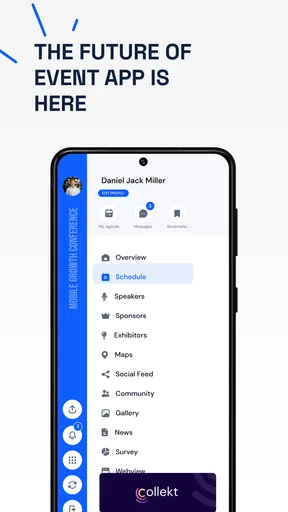
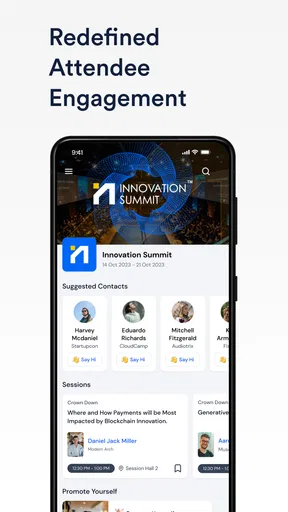
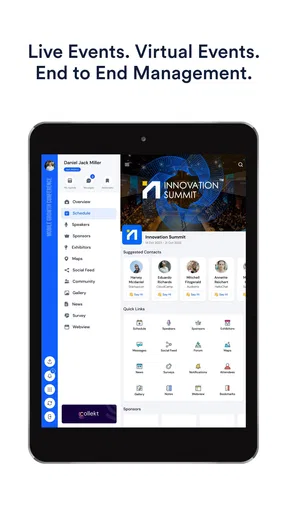
Our Review of Eventify Event App for MICE
 Analysis by Appyee
Eventify Event App for MICE is the kind of event companion I would consider when an organizer needs one focused place for a professional gathering rather than another general social app. After spending time with it, my main impression is that its value depends less on flashy presentation and more on whether the event team has prepared useful content for attendees. When that groundwork is done well, the app can make a meeting, incentive trip, conference, or exhibition feel more organized. When the event information is thin or changes frequently, the experience feels much less convincing.
Developed by Teksmobile, this free Events app is presented as a smart AI-powered event tool. Its purpose is to bring the practical parts of an event into a mobile setting, with the emphasis on the attendee’s experience around a specific occasion. I found that positioning more interesting than the short name suggests: this is not really an app I would open every day for entertainment, but a temporary working space for understanding what is happening, where it is happening, and how to participate without constantly searching through messages or documents.
What Eventify does well for organized events
I find Eventify most useful when an organized event has enough sessions, activities, or venue changes to make a single reference worthwhile. In this section, I’ll focus on the practical difference between gathering information in one place and simply adding another app to an attendee’s phone. That distinction also helps clarify when a simpler alternative may be the better choice.
A focused home for event information
The strongest reason to use Eventify is concentration. Professional events often scatter information across email threads, PDF schedules, messaging groups, registration pages, and last-minute announcements. Even when every individual source is clear, the overall experience becomes tiring. An event app can reduce that friction by giving attendees a single place to return to during the event.
I especially see the benefit for a multi-session conference. A participant may need to check the next talk, remember the room, revisit the event schedule, and keep track of a change while moving between areas. A dedicated app is more convenient than repeatedly opening an inbox and searching for the correct attachment. That is a modest improvement, but it is exactly the sort of improvement that matters when a person is already busy, unfamiliar with the venue, or trying to make a useful connection.
The MICE focus also gives the product a more practical identity than a generic calendar application. Meetings, incentives, conferences, and exhibitions have different rhythms from personal appointments. They involve groups, shared schedules, several activities, and information that becomes useful only during a defined period. Eventify makes sense in that environment because its role is tied to the event rather than to a person’s entire calendar.
Useful when the event team thinks beyond the schedule
A basic agenda is easy to publish, but a good event experience needs more than a list of times. The app becomes more valuable when organizers use it to shape how attendees move through the occasion. For example, a conference participant may want to decide between parallel sessions before leaving a networking area. An exhibition visitor may need a quick reminder of which part of the program deserves attention next. An incentive group may care more about coordinated activities than formal presentations.
My practical tip is to treat the app as a decision aid, not merely a digital brochure. Before relying on it, I would look for the information that answers immediate questions: what should I do next, where should I go, and what matters if I arrive late? If the event content is arranged around those questions, the app can reduce uncertainty. If it only reproduces promotional text, the mobile format adds little.
The AI-powered positioning is potentially useful because event information can be difficult to navigate when there are many sessions or activities. Still, I would judge that promise by the clarity of the actual event experience rather than by the label alone. Smart assistance is worthwhile only when it helps me find relevant information faster or make a better choice. It should not be treated as a substitute for a well-maintained program.
A realistic day with the app
Imagine I am attending a business conference in a venue I do not know. In the morning, I check the event app before leaving the hotel and identify the first session I want to attend. Later, a conversation runs long, so I open the schedule again and choose a different session rather than trying to reconstruct the day from memory. During a break, I use the event information to decide whether to remain near the current room or move to another area. At the end of the day, I return to the program to see what I missed and plan the following morning.
None of those actions is dramatic, but together they show where Eventify can earn its place. It is most useful at moments when an attendee needs a quick answer while already in motion. The app does not need to replace every communication channel to help; it needs to make the event’s core information easier to reach than the alternatives.
Where it compares well with ordinary alternatives
A shared document or PDF can be cheaper and perfectly adequate for a small, simple gathering. A calendar app is often better for personal reminders, especially when I want event appointments mixed with the rest of my day. A messaging group is better for informal conversation and urgent announcements. Eventify sits between those options: it is more event-centered than a calendar, more structured than a chat thread, and potentially easier to browse than a static document.
That middle position is both its strength and its limitation. If the organizer needs a controlled event environment, a dedicated app feels more appropriate than a loose collection of files. If the event is only a short meeting with one location and a few agenda items, installing a separate app may feel unnecessary. I would not recommend using it simply because every event should have an app. I would recommend it when the event has enough moving parts for centralization to save attendees time.
Small workflow choices that improve the experience
One useful habit is to open the app before the event begins, not for a long browsing session, but to understand the shape of the program. I would identify the sessions or activities I care about first, then check the app again when the schedule changes. This avoids the common mistake of treating the full agenda as something to memorize.
A second tip is to keep a backup mental plan. If I am attending an important presentation, I would note its time and general location separately, especially if I will be moving through a crowded venue. A dedicated event app can be convenient, but no mobile tool should become the only thing standing between me and an appointment.
A third insight is that the app’s usefulness grows with event complexity, but not in a perfectly linear way. More sessions create more need for organization, yet they also create more opportunities for outdated or unclear information to frustrate attendees. The organizer’s editing discipline matters just as much as the app’s interface. Users should pay attention to whether the event content feels current and coherent during their first visit.
The main weakness: the experience depends heavily on preparation
The most meaningful weakness I noticed is not a single missing button or isolated annoyance. It is the dependency on the event organizer. Eventify can provide a container for event information, but it cannot make incomplete planning feel complete. If session descriptions are vague, locations are confusing, or updates are not reflected promptly, the attendee still has to ask someone for help.
That dependency makes the app less persuasive for small teams that do not have time to maintain a dedicated event experience. A simple message or shared page may be more reliable when the program is short and unlikely to change. The dedicated format can also introduce a small adoption hurdle: attendees must know which app to use and remember to check it. For a one-hour meeting, that extra step may outweigh the benefit.
I also think the AI emphasis deserves sensible expectations. I would not choose the app on the assumption that intelligent features will solve poor information design. An assistant can help surface content, but it cannot decide what an organizer failed to publish. Users who want a fully personalized planning system, broad travel management, or a replacement for their regular calendar may find the scope narrower than expected.
Who should use it, and who should look elsewhere
Eventify is a good fit for attendees of conferences, exhibitions, incentive programs, and organized business gatherings where the schedule or activities justify a central mobile reference. It may also suit event teams that want a branded, dedicated environment instead of sending participants between several unrelated tools. I would be particularly comfortable recommending it to people who dislike digging through email during a busy event.
It is less suitable for someone looking for a general-purpose event discovery service, a personal calendar, or a year-round social network. It is also not my first choice for a tiny gathering with a fixed agenda. In those cases, a calendar invitation, a concise web page, or a group message may be faster for everyone. The right question is not whether Eventify can hold event information; it is whether the event has enough structure for that information to deserve its own app.
For first-time users, the practical questions are straightforward. Is it free to install? Yes, the app is offered at no cost. Is it suitable for a broad audience? Its content rating is Everyone, so it is positioned for general use rather than a restricted age group. Will it replace a personal calendar? I would not plan on that; its value is tied to the event experience, while a calendar remains better for personal time management.
Device compatibility is also worth checking before an event begins. The current version is 3.1.43, and the listed minimum operating system is Android 7.0. That makes the app accessible to many older Android devices, although I would still install it ahead of travel or the event day rather than waiting until I am standing at the registration desk. A short test beforehand can reveal whether the event content appears as expected and whether I understand where to find the schedule.
How mature does it feel?
Eventify has been available since March 29, 2019, and its audience is established but not enormous. It has passed ten thousand installs, with an average rating of 3.2 from eighty-five ratings and seven written reviews. I read that as a sign to keep expectations measured. There is enough adoption to show that the idea has found real users, but not enough public feedback for me to treat it as an unquestioned standard for every event.
The rating also fits my broader impression: this is a practical, situation-dependent tool rather than an app that wins people over regardless of context. A participant at a well-organized event may find it genuinely helpful, while someone opening it without a relevant event may see little reason to return. That difference can produce very different opinions, because the quality of the event setup is part of the product experience.
My final recommendation
I would recommend Eventify Event App for MICE when the event has a meaningful agenda, several activities, or enough movement that attendees need a reliable central reference. Its best quality is focus: it can turn scattered event details into a more manageable mobile routine. The app is free, broadly age-appropriate, and available for Android devices running version 7.0 or newer, which keeps the entry barrier relatively low.
I would not recommend it automatically for every meeting. If the organizer cannot keep the content clear and current, or if the gathering is too small to justify a dedicated app, a simpler alternative may serve people better. The AI-powered description is appealing, but the real test is whether I can make decisions more easily during the event. Its success depends on turning event information into useful next steps, not merely placing information on a phone.
Overall, I see Eventify as a sensible specialist tool with a clear audience rather than a universal event solution. For a busy conference attendee, it can reduce the small but repeated frustrations of finding the next session and understanding the program. For a casual meetup or personal scheduling needs, I would choose something simpler. If your event team has prepared the content carefully, I think this free app is worth considering; if not, improving the event information should come before choosing any app.
In short, Eventify Event App for MICE is best approached as a focused companion for professionally organized events. I would install it before attending a complex conference or exhibition, use it alongside—not instead of—my normal calendar, and judge it by how quickly it helps me act. That is a modest promise, but in a crowded event schedule, modest improvements can make the day noticeably easier.
Verdict
Strengths of Eventify Event App for MICE
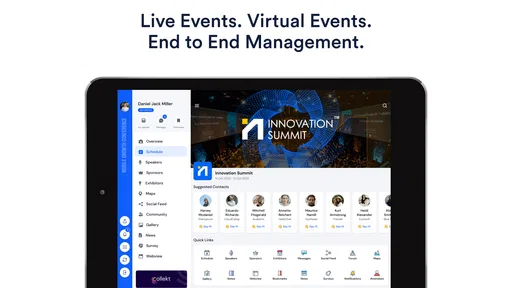
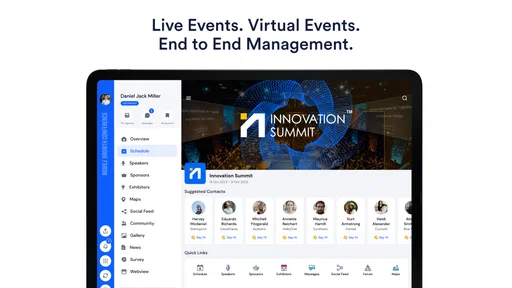
- Centralizes schedules, speakers, maps, and updates in one event app.
- Push notifications help attendees stay informed about agenda changes.
- Supports networking through attendee profiles and meeting features.
- Useful for exhibitors to showcase products and collect visitor leads.
- Custom branding can create a consistent experience for event organizers.
Limitations of Eventify Event App for MICE
- Some features may depend on the organizer’s chosen Eventify package.
- Requires reliable internet access for live updates and online networking.
- The amount of content can feel overwhelming at large conferences.
- Attendee engagement tools may be limited if few participants use the app.
- Battery and data usage may increase during events with frequent notifications.
Similar Picks in This Category
View All
Easy Quran Mp3 Audio Offline
Muslim Worldapp4.7

Invitation Maker: Cards & RSVP
Greetings Island4.9

StubHub - Live Event Tickets
StubHub4.3

Fever: Events & Tickets
Fever Labs4.7

Epic Freebie Games Radar
Arioch Pds - Apps & Games4.4

Invitation card Maker, Design
Splendid App Maker4.9
Frequently Asked Questions
What is Eventify Event App for MICE used for?
Eventify Event App for MICE is designed to support conferences, exhibitions, corporate meetings, trade shows, and other professional events. After exploring its event-focused tools, it appears particularly useful for helping attendees view schedules, discover speakers and exhibitors, receive announcements, connect with other participants, and access important event information from one mobile platform.
Does Eventify Event App for MICE require an event code or registration?
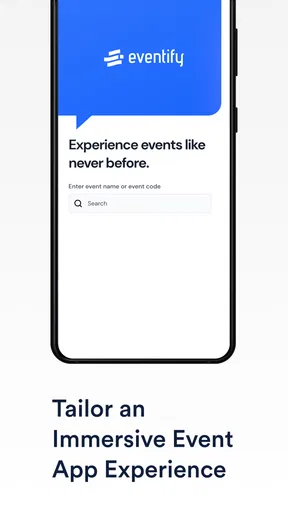
In most cases, you will need to register for a specific event or enter an invitation code, access link, or event identifier provided by the organizer. The app is not generally a standalone social network where all features are available immediately. Access can depend on how the event has been configured, so participants should obtain their login details before downloading.
What features are available for attendees in Eventify?
The app typically brings together practical event features such as personalized agendas, session details, speaker and exhibitor profiles, venue information, notifications, networking tools, and event updates. Depending on the organizer’s setup, you may also find polls, surveys, digital resources, matchmaking, messaging, or interactive maps. Available features can vary between individual events.
Can Eventify Event App for MICE be used without an internet connection?
Some event information may remain accessible after it has been loaded, but a reliable internet connection is normally recommended for the best experience. Live updates, messaging, notifications, networking, polls, registration changes, and synchronized schedules may require mobile data or Wi-Fi. If you are attending an event with limited connectivity, download or open key materials in advance.
Is Eventify Event App for MICE free to download and safe to use?
The application may be free for attendees to download, although access to particular events is controlled by event organizers and participation may require separate registration or payment. As with any event platform, review the permissions requested and the privacy information before creating a profile. Be aware that networking features can make selected profile details visible to other participants.
